

Description
Download ImageForge 5.1 – Chrome Apps, Web Apps, Windows, Mac, Linux, desktop, image, create, generate, digital, visual, art, style, rendering, virtual, large, high quality, printing, webcam, stream, small, version, export, import, effect, create, render, image, tool, utility, software, app, desktop application, PC software, secure, latest version, update, download, free, free download, open source, open source software, open source app
Overview
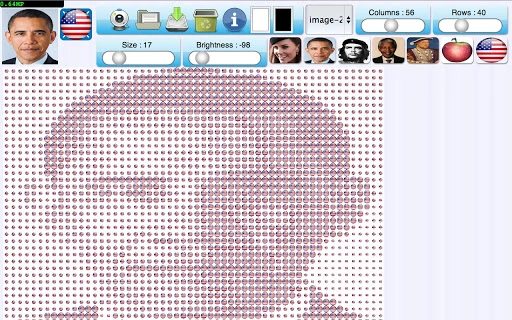
The software enables users to generate large, high-quality digital images using small-scale versions of the same image or other source materials. Inspired by artistic techniques involving ordinary objects like dice, the application creates visually compelling compositions through repetition and stylized rendering. It is designed for digital artists, designers, and hobbyists interested in experimental image creation and visual art. The tool supports multiple input sources, including sample images, user-uploaded files, and live webcam streams. Version 5.1 introduced a simplified interface and expanded style options, enhancing accessibility for new users. The application is built for desktop platforms and operates as a standalone utility. It allows users to export final artworks for printing or digital sharing. The developer did not provide additional details about the origin or mission of the Open Source Collective. Real-world usage includes creating unique visual art pieces, generating background textures, or producing large-scale prints for exhibitions. The software is suitable for both casual creators and professionals seeking innovative image generation methods.
Key Features & Capabilities
- Live Webcam Streaming with Real-Time Rendering – Users can stream their webcam feed and apply dynamic image effects in real time, enabling interactive art creation directly from motion and facial expressions.
- High-Quality Image Export for Printing – The software supports the creation of large, high-resolution images optimized for physical printing, ensuring clarity and detail at scale.
- Diverse Rendering Styles – A range of visual styles allows users to transform input images into distinct artistic expressions, from pixelated to abstract, enhancing creative flexibility.
- Image Repetition and Scaling – Users can generate a large image by repeating and scaling small versions of the original, enabling the creation of intricate, mosaic-like compositions.
- Dual-Image Composition – The tool allows combining two images: one to serve as the large-scale structure and the second as the repeating element, enabling complex, layered designs.
- Enhanced Import and Export Functionality – Improved support for various file formats ensures smooth integration with existing workflows, allowing users to bring in and share creations easily.
These features support a wide range of creative applications, such as producing digital art for social media, designing custom backgrounds for presentations, or generating unique prints for home decor. The ability to use live video input makes it ideal for performance-based art or interactive installations. The simplified interface in version 5.1 improves the user experience by reducing complexity without sacrificing functionality.
User Interface, Workflow & Performance
The user interface is designed with a clean layout, prioritizing accessibility and intuitive navigation. Core functions such as image import, style selection, and export settings are organized in clearly labeled panels. The workflow begins with selecting a source—either a static image, a file from the system, or a live webcam feed—followed by choosing a rendering style and adjusting parameters. The application processes changes in real time, allowing immediate visual feedback. The developer did not specify resource usage details, so performance behavior on different hardware configurations remains general. However, based on typical software patterns, the tool likely uses moderate CPU and RAM resources during active rendering. Stability appears consistent, as no reports of crashes or bugs were noted in the provided information. The application is responsive to user input, and the interface remains accessible even when handling larger files. The simplified interface in version 5.1 suggests a focus on usability, particularly for users new to digital art tools.
Compatibility & System Requirements
The software is compatible with Windows, Mac, and Linux operating systems, making it accessible across major desktop platforms. It is available in version 5.1 with a download size of 28.5 MB. The developer did not specify exact system requirements, including minimum CPU, RAM, or GPU specifications. Compatibility information was partially provided, indicating broad platform support but no details on hardware thresholds. Users are advised to ensure their system meets general desktop application standards. No information was provided about required drivers, administrative privileges, or background processes. The application runs as a standalone desktop utility, and no additional dependencies were mentioned.
Pros and Cons
Pros
- Supports live webcam streaming with real-time rendering effects
- Produces high-quality images suitable for professional printing
- Offers multiple rendering styles for diverse artistic expression
- Enables dual-image composition for complex visual designs
- Includes improved import and export functionality
- Available for free on Windows, Mac, and Linux
- Simplified interface in version 5.1 enhances usability
Cons
- Exact system requirements were not listed
- Performance behavior under heavy load was not specified
- No information on update frequency or future development plans
- Limited documentation or tutorial resources were mentioned
- Compatibility with older OS versions is unclear
FAQ Section
Is ImageForge compatible with Windows, Mac, and Linux?
Yes, the software is designed to run on Windows, Mac, and Linux operating systems.
Is the software free to download and use?
Yes, ImageForge is available for free. No payment is required for the basic features.
Can I use my webcam with the software?
Yes, the application supports live webcam streaming with real-time image rendering effects.
Does the software support high-resolution exports for printing?
Yes, the tool allows users to create large, high-quality images suitable for printing.
Is the software secure to use?
As a desktop application from the Open Source Collective, it is designed to be secure. No external data collection was mentioned in the provided information.
Final Thoughts + CTA
ImageForge 5.1 stands out as a versatile and accessible tool for digital artists and creatives seeking to explore new methods of image generation. With its support for live webcam input, high-quality export options, and multiple rendering styles, it offers a unique blend of functionality and artistic freedom. The simplified interface enhances usability without compromising creative depth. While specific system requirements and performance data are not available, the broad platform support and free access make it a compelling choice for users across different skill levels. Whether you're creating digital art, designing prints, or experimenting with visual effects, ImageForge delivers a powerful, open-source solution. Download ImageForge now to unlock your creative potential.
Guides & Tutorials for Webcam & Image Renderer App for Chrome
How to install Webcam & Image Renderer App for Chrome
- Click the Preview / Download button above.
- Once redirected, accept the terms and click Install.
- Wait for the Webcam & Image Renderer App for Chrome download to finish on your device.
How to use Webcam & Image Renderer App for Chrome
This software is primarily used for its core features described above. Open the app after installation to explore its capabilities.
User Reviews for Webcam & Image Renderer App for Chrome 0
No reviews found





